How to Book Restaurants in Korea Without a Korean Phone Number
Use CATCHTABLE Global to reserve or join waitlists in Korea without a Korean phone number, plus what to do when a kiosk or restaurant needs one.
If you're visiting Korea without a Korean phone number, start with CATCHTABLE Global. It's the international version of a major Korean restaurant booking service, and you can create an account without Korean phone verification. It won't cover every restaurant, and seeing a restaurant listed doesn't mean every booking option is open right now. What saves the most dinners is checking what a restaurant actually offers today, then having a plan for when none of it works for you.
Four ways Korean restaurants seat people
| Type | What it means | What you do |
|---|---|---|
| Dated reservation | A set date, time and party size, booked in advance | Book ahead, read the terms, and arrive on time |
| Remote waitlist | A same-day queue you join from your phone | Join only when you can get there in time, then watch for updates |
| On-site waitlist | A queue that exists only at the entrance, often on a tablet | Register in person and stay close by |
| Ordinary walk-in | No booking system; free tables go to whoever is there | Turn up, ask, and be ready to try somewhere else |
If you can't find a reservation option, don't assume the restaurant is fully booked or queue-only. Check the branch's own instructions on its listing first.
Start with CATCHTABLE Global
The Korea Tourism Organization's visitor guide says the global service lets you sign up with Google, Apple or email instead of a Korean number, and it accepts overseas-issued cards for reservation deposits. Each venue offers its own combination of options: booking ahead, joining a remote waitlist, or seating on-site only. Which restaurants participate varies, and the guide describes waitlists as deposit-free.
Overseas cards being accepted doesn't mean every issuer or every payment will go through, so bring a backup card.
The desktop site has an English search box labeled "Restaurant, Location or Cuisine" and an ENG language selector. It's worth installing the app as well. The developer's Google Play listing says confirmations arrive by email and in the app, and that reservations and waitlists are tracked under My Dining.
Set up your account before your trip, using an email you'll actually check while you're away. Bookings and waitlist updates happen online, so make sure you'll have mobile data or Wi-Fi. A data-only eSIM gives you internet access, but not necessarily a Korean number, SMS, or identity verification. Our eSIM vs SIM vs pocket Wi-Fi guide explains what each option includes.
Find the exact branch first
Popular restaurants often have several branches, and similar names sometimes belong to unrelated businesses. Search for the restaurant name plus the neighborhood, then compare the address on the listing with a map app. Our Google Maps vs Naver Map vs KakaoMap guide explains which app to use. Make sure you have the right district before you pick a date.
What the reservation flow looks like
From Home, choose a neighborhood (Seongsu in this example) and open a restaurant from the list. The example here is PEREHIL (페레힐), chosen only to show the interface, not as a recommendation. Its page has sections for Home, News, Menu, Photo, Review and Info, separate Reservation and Waitlist tabs, and a Reserve button.
- Click Reserve. A calendar opens, along with a party-size selector and buttons for available times.
- Choose your date and party size, then a time.
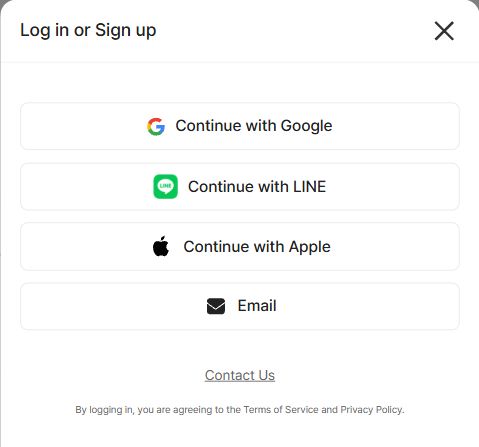
- On the desktop site, choosing a time brought up a "Better in the app" notice. Choosing Later opened a "Log in or Sign up" box offering Google, LINE, Apple and Email.
These screenshots show the desktop website up to its sign-in step; the mobile app may look different. Use the app to follow live status.
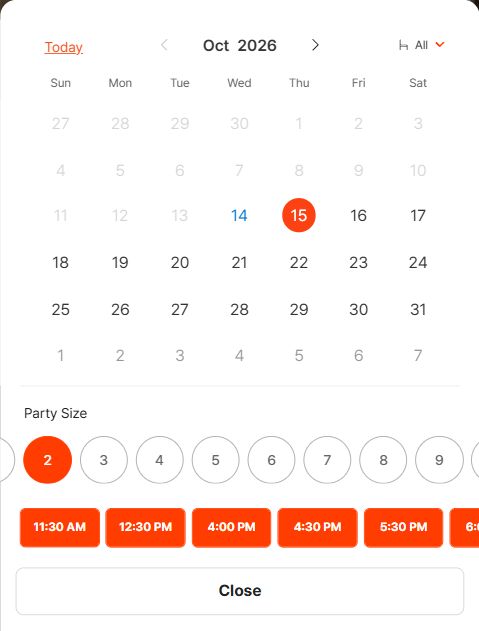
PEREHIL's reservation calendar on the CATCHTABLE Global desktop site, captured October 14, 2026. Availability changes constantly, so this shows how the controls work, not which times are open.
Before you confirm: read the terms
Each restaurant sets its own deposit and cancellation rules. Before you tap the final button, check:
- Deposit amount, and whether it's charged per person or per booking
- Cancellation cutoff: how far in advance you can cancel without losing anything
- Refunds: full or partial, and how long they take
- Late arrival and no-shows: how long they'll hold the table, and what happens if you don't come
- The bill: whether the deposit is credited toward your meal, refunded separately, or kept, and what you'll still owe at the restaurant
Take a screenshot of the terms so you can find them easily later.
After booking: check My Dining
Open My Dining and make sure the reservation is there with the right restaurant, branch, date, time and party size. Emails can be delayed or end up in spam, so a missing confirmation email doesn't prove the booking failed. A card charge on its own doesn't prove your table is confirmed either. If details are missing or wrong, contact support or the restaurant before booking again. Otherwise you could end up with two bookings and two deposits.
Waitlists: a tab doesn't mean the queue is open
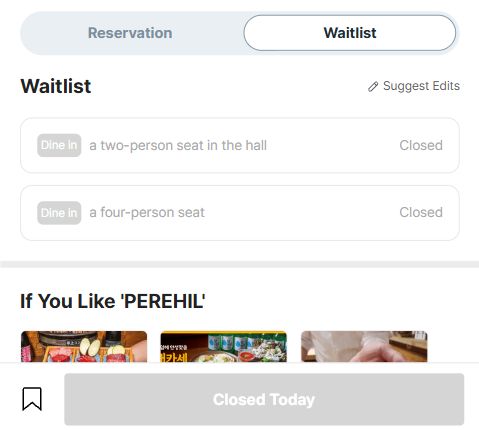
PEREHIL's waitlist was closed when this was captured on October 14, 2026. That reflects the waitlist status only, not the restaurant's opening hours.
PEREHIL has a Waitlist tab, but when this screenshot was taken, both seating options were greyed out and marked Closed, with Closed Today at the bottom. That message describes the waitlist only. It doesn't tell you the restaurant's hours or whether diners with reservations are being seated. A waitlist may open only at certain times, or not at all on some days.
When a remote waitlist is open, join only if you can realistically get there in time. Keep your phone charged, check My Dining regularly, and follow any arrival instructions the app gives you.
When a door kiosk asks for a Korean number
Many on-site queues use a tablet that asks for a phone number so it can text you when your table is ready. What restaurants offer instead varies. Ask staff whether they can register you as a visitor or have another way for you to wait, and follow their instructions. Never type in someone else's number, because the alert would go to them. Once you're in the queue, stay where staff can see you.
When the restaurant isn't on CATCHTABLE
- Check how the restaurant takes bookings. Its map listing or official social account may explain its booking method, or say that it's walk-in only.
- Ask your accommodation, if it has a front desk. Staff may be willing to call the restaurant for you. Ask early, since it's a favor rather than a guaranteed service.
- Avoid the busiest hours. You'll often wait less, but it's not guaranteed. Check the break time and last order time first so you don't arrive while the kitchen is closed.
- Save two backups nearby so a full house doesn't end your evening.
Three phrases to save
- 예약했어요. "I have a reservation."
- 한국 전화번호가 없어요. "I don't have a Korean phone number."
- 얼마나 기다려야 해요? "How long is the wait?"
It's fine to just show these on your screen. Once you're seated, our guide to ordering at a Korean restaurant takes it from there.
The practical plan
Set up CATCHTABLE Global and the app before you fly. For the one or two meals that matter most, book ahead, screenshot the terms, and check My Dining afterward. Use remote waitlists when they're open, and treat a closed one as a reason to change plans rather than a dead end. For everything else, go at a sensible time, save your phrases, and keep a backup restaurant close by.
Dining on your own? Our guide to eating alone in Korea covers portion minimums, solo seating and what to order once you arrive.
Frequently asked questions
›Will restaurant staff speak English if I booked in English?
Not necessarily. An English booking screen doesn't mean the staff speak English. Keep your booking details and a few Korean phrases ready on your phone so you can show them at the door.
›What should I have ready when I arrive for a booked table?
Have the booking open in My Dining, along with the name you booked under. If you paid a deposit, have the card you used handy. That way staff can find your reservation quickly even if you don't share a language.
›Do other Korean booking apps work the same way as CATCHTABLE Global?
Don't assume they do. Sign-up and verification rules differ by service, so check each app's requirements before you rely on it for an important meal.